GTM engineers
Compose repeatable research runs, map fields, and pass structured results into governed workflows.
Give your AI agent an ICP, a market, and a research goal. Bardeen coordinates company discovery, contact enrichment, message preparation, and a human approval gate without forcing your team into another seat-based workspace.
Install in your AI agent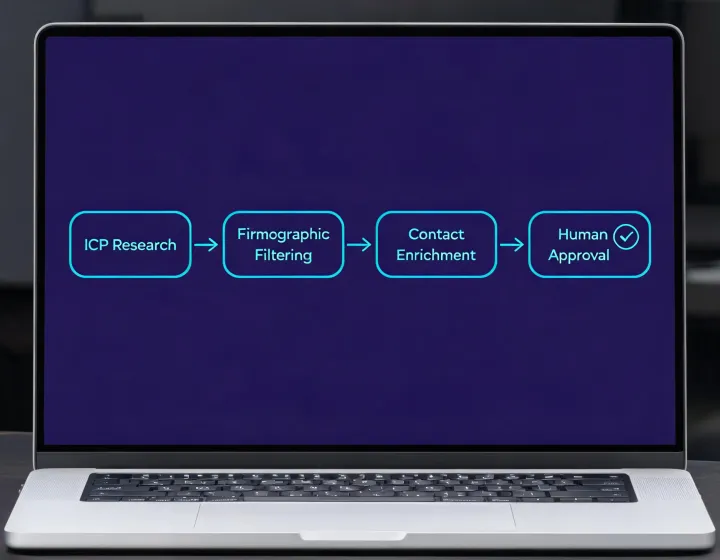 ICP briefEnrichReview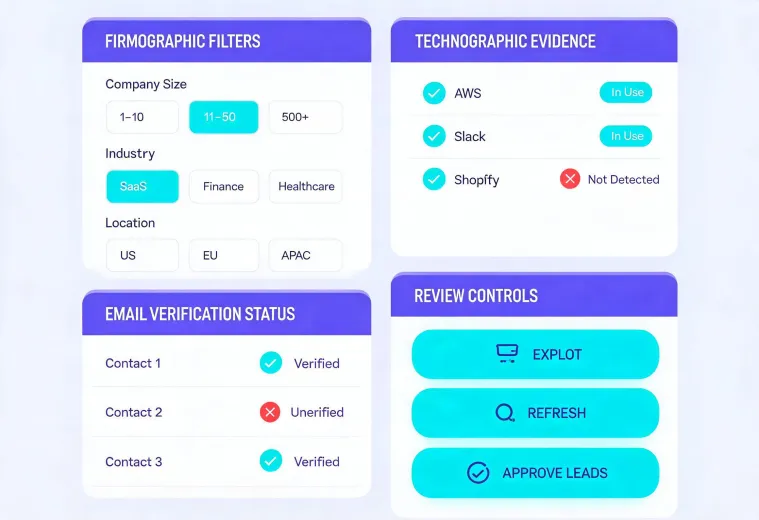
Start with natural-language criteria for company size, geography, role, and technology.
Review source notes, enrichment status, and unresolved fields before a record moves forward.
Drafts remain behind a human-in-the-loop checkpoint so relevance and sender reputation stay in your hands.
Compose repeatable research runs, map fields, and pass structured results into governed workflows.
Give reps a consistent ICP process while preserving message review and send authority.
Move from an early market hypothesis to a focused account list without purchasing unused seats.
Audit enrichment provenance, deduplicate records, and protect CRM field quality.
Separate client criteria, evidence, and approvals while keeping execution reproducible.
Write the ICP, exclusions, and target buying role.
Find accounts through firmographic and technographic context.
Resolve decision makers and verify available business contact data.
Inspect the result and decide what enters the next workflow.
npx -y @okki-global/okki-go-taroballThe button copies only the exact command.
Execute it in a supported agent environment and inspect the package prompt.
Add only the credentials required for the workflow you choose.
Run a small research task and check evidence before expanding scope.
The installer adds the skill to your agent environment; copying the command alone does not install anything.
No. Prospect research and message preparation are separate from sending, and teams should retain an explicit human approval step.
Use environment secrets supported by your runtime. Do not paste credentials into prompts, logs, or shared result files.
Review the package instructions surfaced by the installer and your agent runtime before changing or removing the integration.
Yes. Begin with a narrow ICP and a short result set, then validate field provenance and contact status.